Getting Started
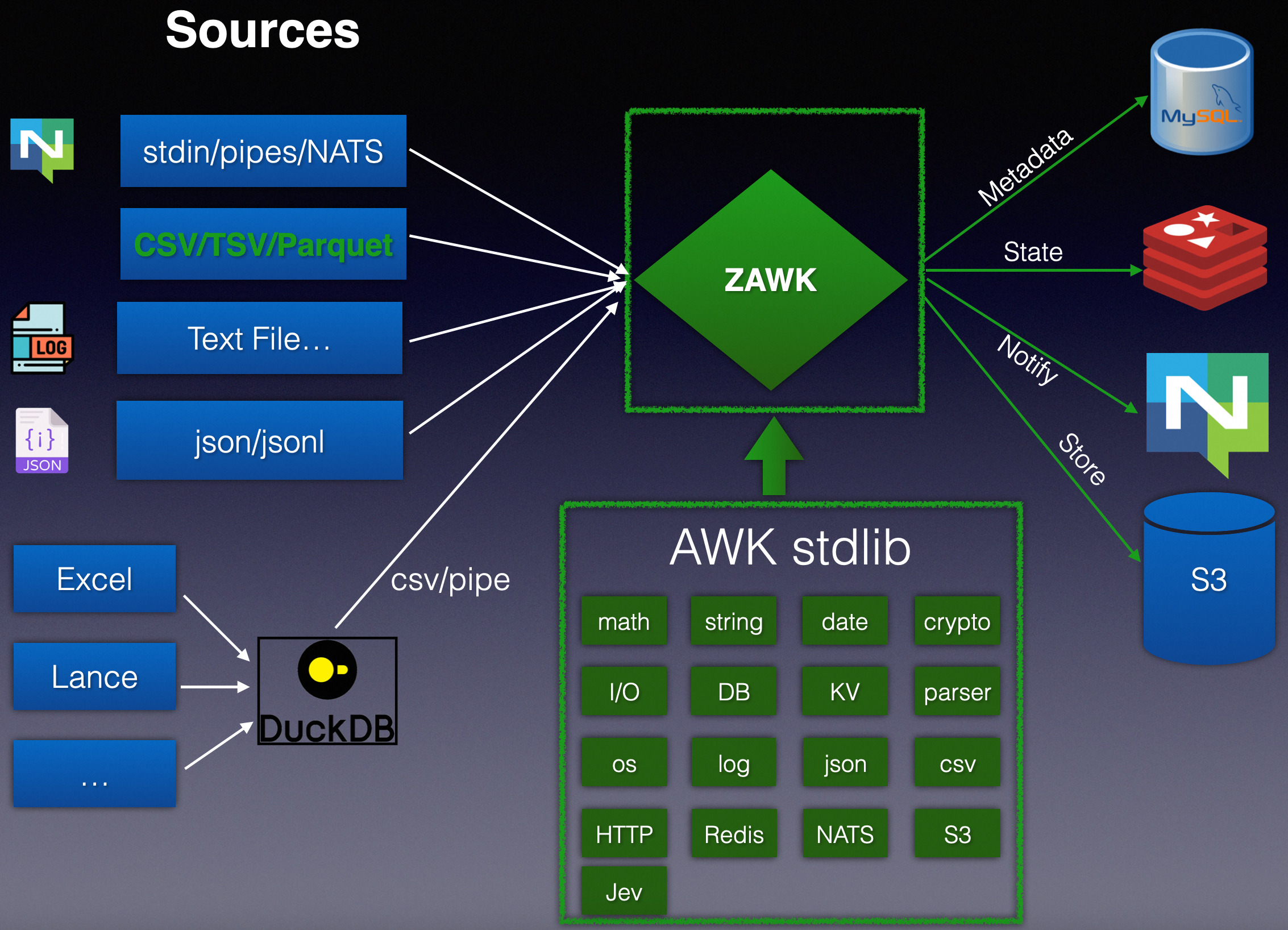
zawk is a modern AWK: zawk = AWK + stdlib + Rust.
It runs the AWK programs you already know (it is gawk mostly compatible and the successor of frawk), compiles them to machine code with Cranelift, and adds what AWK has always been missing for today's data work:
- Structured input and output: CSV/TSV (RFC 4180), JSON, JSON Lines, Apache Parquet, Markdown tables and Excel,
from local files, stdin,
http(s)://,s3://, database tables and NATS subjects. - A standard library of ~190 functions: text, JSON/XML/HTML, date/time, crypto/JWT, encoding, IDs, statistics, HTTP, SQLite/MySQL/PostgreSQL, Redis/NATS KV, S3, NATS/MQTT and LLM decisions.
- Modern syntax: f-strings, raw strings,
??,try ... else,matchexpressions,localvariables,for (k, v in arr), ranges,!in, negative field indexes andassert. - Tooling for people and AI agents:
zawk lint,zawk fmt,zawk inspect,zawk functionsandzawk llm.
Installation
Mac with Homebrew:
brew install linux-china/tap/zawk
sudo xattr -r -d com.apple.quarantine $(readlink -f $(brew --prefix zawk))
With cargo-binstall:
cargo binstall zawk
From source (needs Rust):
cargo install zawk
# or, from a clone of the repository
cargo install --path .
SIMD fast paths (SSE2/AVX2) are selected at runtime, so the default build runs on any CPU of the target
architecture. To optimize for the CPU you build on, use RUSTFLAGS="-C target-cpu=native" cargo install zawk
(don't distribute that binary: it may crash with SIGILL on other machines).
Check the installation:
$ zawk --version
zawk 0.6.6
Your first programs
zawk is AWK, so classic one-liners work unchanged:
zawk '{ print $1 }' access.log
zawk -F: '$3 >= 1000 { print $1 }' /etc/passwd
zawk '!seen[$0]++' data.txt               # remove duplicate lines
Now with a CSV file demo.csv:
id,name,age
1,Jackie,48
2,Love,49
3,Leo,24
4,Lucas,10
5,Laura,8
# -i csv parses quoted fields correctly, -H makes the header available as FI
$ zawk -i csv -H '$FI["age"] > 20 { print $FI["name"], $FI["age"] }' demo.csv
Jackie 48
Love 49
Leo 24

# Output a Markdown table: the first printed record is the header
$ zawk -i csv -H -o md 'NR==1 { print "name", "age" } { print $FI["name"], $FI["age"] }' demo.csv
| name | age |
| --- | --- |
| Jackie | 48 |
| Love | 49 |
...

# f-strings with format specs, and stdlib functions inside placeholders
$ zawk -i csv -H '{ print f"{NR}: {toupper($FI[\"name\"]):<8} age {$FI[\"age\"]:>3}" }' demo.csv
1: JACKIE   age  48
2: LOVE     age  49
3: LEO      age  24
4: LUCAS    age  10
5: LAURA    age   8
A command-line program that is only a list of fields is shorthand for printing them:
zawk '$1,$3' data.txt # same as zawk '{ print $1, $3 }'
Command line at a glance
zawk [options] 'program' [file ...]
zawk [options] -f script.awk [file ...]
| Option | Meaning |
|---|---|
-F fs | Field separator, as in awk (-F,, -F'\t') |
-v var=value | Set a variable before BEGIN (repeatable) |
-f file / -e text | Program from a file (or an https:// URL, or a Markdown file) / from text |
-i csv|tsv|json|jsonl|parquet|markdown|xlsx | Input format (not gawk's -i include) |
-H | First line is a header: $FI["col"] is the field of column col |
-o csv|tsv|markdown|table|jsonl|parquet | Output format of print |
--out-file FILE | Write stdout to FILE (required for -o parquet unless redirected) |
-p r -j N | Run in parallel over records with N workers |
--lint | Lint the program before running it |
--posix | Disable zawk's command-line sugar |
Input files can be local paths, - (stdin), https:// URLs, s3://bucket/key, database URLs
(sqlite://, mysql://, postgresql://) or a NATS subject. Compressed input (gz, zst, bz2, xz, lz4) is
detected and decompressed automatically, and a .env file in the current directory is loaded as environment
variables.
Where to go next
- New AWK Syntax: everything zawk adds to the language.
- Standard Library: ~190 functions, by category.
- Tutorials: databases, NATS, AI integration, HTTP APIs, S3 and Parquet.
- Differences from gawk and the FAQ.